A weak WiFi signal can make everyday internet use frustrating, especially in rooms that are far away from the main router. A WiFi extender can help improve coverage by receiving your existing wireless signal and extending it into areas where the connection is weak.
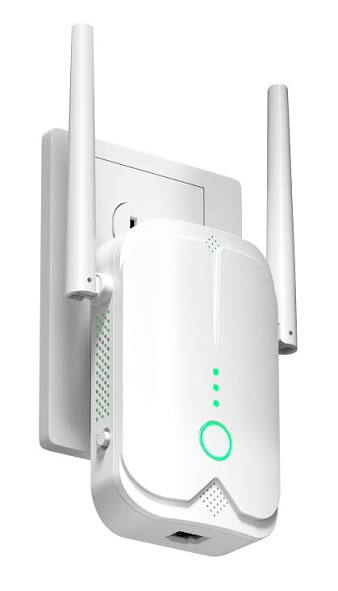
With so many WiFi extenders available, choosing the right one can be confusing. Speed ratings, WiFi standards, coverage, Ethernet ports and mesh compatibility can all affect which model makes sense for your home.
In this guide, we look at several WiFi extenders worth considering in 2026 and explain what makes each one useful for different situations.
Important: Advertised WiFi speeds and coverage are theoretical or manufacturer-rated figures and real-world performance can vary depending on your router, walls, interference, device and internet connection.
Quick Overview
The right WiFi extender depends on your home size, router, number of connected devices and the type of internet activities you do.
WiFi Extenders Worth Considering in 2026
| WiFi Extender | Best For | Approx. Price* | WiFi Standard | Speed Class | Check Latest Price |
|---|---|---|---|---|---|
| TP-Link RE715X | Overall value | Around $70+ | WiFi 6 | AX3000 | Check Latest Price → |
| NETGEAR EAX17 | High-speed WiFi 6 | Around $100 | WiFi 6 | AX3000 | Check Latest Price → |
| ASUS RP-AX58 | ASUS users | Around $80 | WiFi 6 | AX3000 | Check Latest Price → |
| TP-Link RE813XE | WiFi 6E performance | Around $180+ | WiFi 6E | AXE5400 | Check Latest Price → |
| TP-Link RE3200BE | WiFi 7 upgrade | Varies | WiFi 7 | BE3200 | Check Latest Price → |
| NETGEAR EAX15 | Easy mesh setup | Around $100 | WiFi 6 | AX1800 | Check Latest Price → |
| NETGEAR EAX12 | Budget-friendly option | Around $80 | WiFi 6 | AX1600 | Check Latest Price → |
*Prices can change by retailer, promotions, location and availability.
1. TP-Link RE715X — Best Overall Value
The TP-Link RE715X is an AX3000 WiFi 6 range extender designed to improve wireless coverage while offering faster speeds than older WiFi 5 extenders.
It supports dual-band WiFi with up to 3.0 Gbps combined theoretical speed and includes a Gigabit Ethernet port. It is also compatible with TP-Link EasyMesh, allowing compatible routers and extenders to work together as a mesh network.
Key Features
- WiFi 6 technology
- AX3000 dual-band performance
- Up to 3.0 Gbps combined theoretical speed
- Gigabit Ethernet port
- EasyMesh compatibility
- Smart Roaming
- Access Point mode
- TP-Link Tether app support
Who Should Consider It?
The RE715X may be a good choice for people who want a modern WiFi 6 extender without moving to a more expensive WiFi 6E or WiFi 7 setup.
👉 Check Latest Price →
2. NETGEAR EAX17 — Best for High-Speed WiFi 6
The NETGEAR EAX17 is an AX3000 dual-band WiFi 6 mesh extender designed for homes that need additional wireless coverage and support for multiple connected devices.
NETGEAR lists speeds up to 3 Gbps for the EAX17 and positions it as a WiFi 6 mesh extender.
Key Features
- WiFi 6 technology
- AX3000 performance
- Up to 3 Gbps theoretical speed
- Dual-band connectivity
- Mesh capabilities
- Designed for multiple connected devices
- Easy setup
Who Should Consider It?
It may be worth considering if you want a relatively fast WiFi 6 extender and prefer the NETGEAR ecosystem.
👉 Check Latest Price →
3. ASUS RP-AX58 — Best for ASUS Users
The ASUS RP-AX58 is an AX3000 dual-band WiFi 6 range extender designed to work with virtually any WiFi router.
One of its biggest advantages is ASUS AiMesh compatibility. If you already have a compatible ASUS router, the extender can become part of a more seamless whole-home network.
Key Features
- WiFi 6 technology
- AX3000 performance
- Up to 2402 Mbps on 5 GHz
- Up to 574 Mbps on 2.4 GHz
- AiMesh compatibility
- Gigabit Ethernet port
- Access Point mode
- ASUS Router and Extender app support
Who Should Consider It?
This is particularly interesting for people who already use an ASUS router and want to expand coverage without moving away from the ASUS ecosystem.
👉 Check Latest Price →
4. TP-Link RE813XE — Best for WiFi 6E Performance
The TP-Link RE813XE is a tri-band WiFi 6E range extender designed for users who want access to the newer 6 GHz wireless band.
Its AXE5400 class and 160 MHz channel support make it a more advanced option than traditional WiFi 6 extenders. TP-Link lists features including tri-band WiFi, smart roaming and easy setup.
Key Features
- WiFi 6E technology
- AXE5400 class
- Tri-band connectivity
- 6 GHz band support
- 160 MHz channel bandwidth
- Smart Roaming
- Easy setup
- Ethernet connectivity
Who Should Consider It?
The RE813XE can make sense for users with newer WiFi 6E-compatible devices who want a higher-end extender.
👉 Check Latest Price →
5. TP-Link RE3200BE — Best for WiFi 7
The TP-Link RE3200BE brings WiFi 7 technology to the range-extender category.
It supports dual-band WiFi 7 with speeds up to 3.2 Gbps and includes Multi-Link Operation (MLO), 4K-QAM and a Gigabit Ethernet port. It is also EasyMesh-compatible.
Key Features
- WiFi 7 technology
- Up to 3.2 Gbps theoretical speed
- Multi-Link Operation
- 4K-QAM
- 160 MHz bandwidth
- Gigabit Ethernet port
- EasyMesh compatibility
- Smart Roaming
Who Should Consider It?
If you’re upgrading to WiFi 7 devices or want a more future-ready wireless setup, the RE3200BE is an option worth considering.
👉 Check Latest Price →
6. NETGEAR EAX15 — Best for Easy Mesh Setup
The NETGEAR EAX15 is a dual-band WiFi 6 mesh extender with an advertised speed class of AX1800.
NETGEAR lists it with up to 1.8 Gbps theoretical speed and describes it as a wall-plug WiFi 6 mesh extender.
Key Features
- WiFi 6 technology
- AX1800 performance
- Up to 1.8 Gbps theoretical speed
- Dual-band connectivity
- Mesh functionality
- Wall-plug design
- Easy setup
Who Should Consider It?
It may be a practical option for users who want a straightforward WiFi 6 extender without stepping up to higher-end AX3000 or WiFi 6E hardware.
👉 Check Latest Price →
7. NETGEAR EAX12 — Budget-Friendly Option
The NETGEAR EAX12 is an AX1600 dual-band WiFi 6 mesh extender designed for people who want to improve coverage without spending as much on a high-end extender.
NETGEAR currently lists the EAX12 at around $79.99 on its product range page, although retailer prices can vary.
Key Features
- WiFi 6 technology
- AX1600 performance
- Up to 1.6 Gbps theoretical speed
- Dual-band connectivity
- Mesh support
- Wall-plug design
- Internal antennas
Who Should Consider It?
The EAX12 can be worth considering for smaller homes, apartments or users who mainly need to improve coverage in one or two weak-signal areas.
👉 Check Latest Price →
What Is a WiFi Extender?
A WiFi extender, sometimes called a range extender or WiFi booster, receives the wireless signal from your existing router and rebroadcasts it to help reach areas with weaker coverage.
This can be useful when your router provides a strong connection in one part of the house but struggles to reach another room, upstairs area, basement or other hard-to-cover location.
However, an extender doesn’t magically increase the speed of your internet plan. Its main purpose is to improve wireless coverage.
WiFi Extender vs. Mesh WiFi
Before buying an extender, it’s worth understanding the difference between a traditional extender and a mesh WiFi system.
WiFi Extender
A traditional extender is usually a single device that connects to your existing router and extends its wireless coverage.
Best for:
- One or two weak areas
- Smaller homes
- Lower-cost upgrades
- Existing router users
Mesh WiFi
A mesh system generally uses multiple coordinated units to provide broader whole-home coverage.
Best for:
- Large homes
- Multiple floors
- Many connected devices
- Seamless whole-home coverage
If your home has widespread coverage problems, a mesh system may be a better long-term solution than adding multiple traditional extenders.
What to Look For in a WiFi Extender
1. WiFi Standard
WiFi 6 and WiFi 7 extenders generally offer newer technology than older WiFi 5 models.
If you have newer phones, laptops or other devices, choosing a newer WiFi standard may make more sense.
2. Speed Rating
Extenders are commonly marketed with ratings such as AX1800, AX3000 or AXE5400.
These numbers represent theoretical combined wireless capacity rather than the actual internet speed you will necessarily experience.
3. Dual-Band vs. Tri-Band
Dual-band extenders generally use 2.4 GHz and 5 GHz bands.
Tri-band models add another wireless band, which can help in certain higher-performance setups.
4. Ethernet Port
A Gigabit or multi-gig Ethernet port can be useful if you want to connect a smart TV, gaming console, desktop PC or another wired device to the extender.
5. Mesh Compatibility
If your existing router supports a compatible mesh technology such as EasyMesh or AiMesh, choosing an extender that supports the same ecosystem can provide a more integrated experience.
6. Placement
Where you place the extender matters.
An extender should generally be placed somewhere that still receives a reasonably strong signal from your main router rather than directly inside the dead zone.
Are WiFi Extenders Worth It?
For many homes, a WiFi extender can be a simple way to improve coverage without replacing the existing router.
They can be particularly useful when only a specific room or area has weak WiFi.
However, if your entire home has poor coverage or you have a large multi-story property, a mesh WiFi system may provide a better overall experience.
Which WiFi Extender Is Best for Gaming?
Gaming performance depends on several factors, including latency, signal strength, interference and the connection between the extender and router.
A WiFi 6 or WiFi 7 extender with a strong connection to the main router may be preferable to an older extender.
For serious competitive gaming, a wired Ethernet connection is often preferable whenever practical.
Which WiFi Extender Is Best for a Large Home?
There isn’t one universal answer.
For larger homes, consider a higher-performance extender, a tri-band model or a complete mesh WiFi system.
The TP-Link RE813XE, for example, uses tri-band WiFi 6E technology, while WiFi 7 options such as the TP-Link RE3200BE are designed for newer high-performance networks.
Final Verdict
The best WiFi extender depends on your existing router, home layout, internet plan and the devices you use.
For a straightforward WiFi 6 upgrade, models such as the TP-Link RE715X, NETGEAR EAX17 and ASUS RP-AX58 are worth considering.
Users looking for newer technology can look toward WiFi 6E or WiFi 7 models such as the TP-Link RE813XE and RE3200BE.
Before buying, check compatibility with your router, compare current prices and consider whether a mesh WiFi system would be a better solution for your home.
Frequently Asked Questions
Do WiFi extenders increase internet speed?
Not necessarily. Their primary purpose is to improve WiFi coverage. Actual speeds depend on your internet connection, router, extender placement, wireless interference and connected devices.
Can I use a WiFi extender with any router?
Many extenders are designed to work with a wide range of routers. However, special mesh features may require compatible hardware from the same ecosystem.
Where should I place a WiFi extender?
A good starting point is somewhere between your router and the area with weak coverage, where the extender can still receive a reasonably strong signal from the router.
Is WiFi 7 better than WiFi 6?
WiFi 7 is a newer standard with technologies designed to improve throughput, latency and efficiency. However, the benefits depend on whether your router and client devices also support the newer technology.
Should I buy an extender or mesh WiFi?
If you have one specific weak area, an extender may be enough. For large homes, multiple floors or widespread coverage problems, a mesh system may be a better option.
Do WiFi extenders work with 5 GHz WiFi?
Yes. Many modern dual-band and tri-band extenders support both 2.4 GHz and 5 GHz wireless networks.
Affiliate Disclosure
Smart Deals Path may participate in affiliate programs. Some links in this article may be affiliate links, which means we may earn a commission from qualifying purchases made through those links, at no additional cost to you.
Prices, specifications, availability and promotions can change at any time. Please verify the latest information directly with the retailer or manufacturer before purchasing.